SourceTree Issue: This is not a Valid Working Copy Path
Introduction
We will discuss a quick tip to resolve the SourceTree issue mentioned in the title.
Background
My system got upgraded to Windows 8.1 and I had to install all required software for the development work. I use SourceTree as a tool for Git commands for projects. So, I installed that again after the format.
Problem
Unfortunately, when I started adding the projects as working copies, it complained to me that “This is not a valid working copy path“. The error is not so self-explanatory, which triggered research work.
Solution
Before I landed on the solution, I visited all available menu options in SourceTree to discover the problem. Finally, something engrossed me. I was on Git Tab.
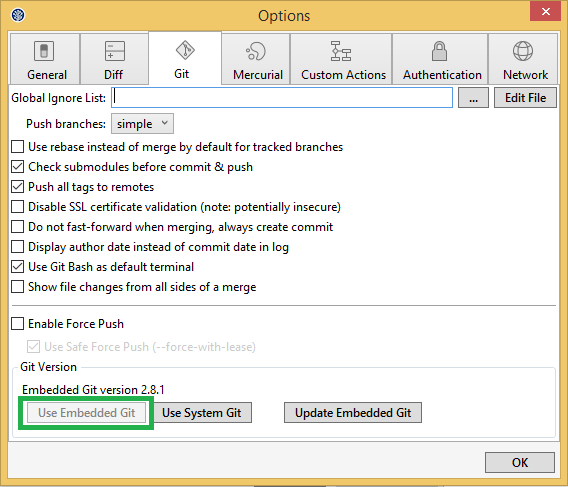
Tools -> Options -> Git
I found some buttons saying “Use Embedded Git“, and “Use System Git” at the bottom. So, I suspected that Git is not yet enabled for SourceTree. Therefore, it is not able to identify my commands. I enabled it, that’s why it is shown as disabled below.
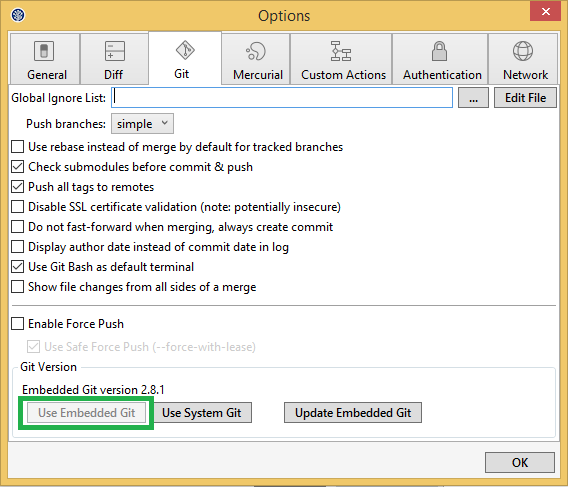
Voila!!! Everything started working as expected.
Help Someone
Share in your circle. Hit the social icons below. Keep coding folks. 😃
Thanks for reading, have a great day ahead.
About the author
As a 🚀 Vice President with over 12 years of experience, I am a seasoned software architect known for designing and leading teams of engineers to deliver high-quality software products promptly and within budget.
Throughout my career, I have spearheaded the end-to-end design of 7 innovative software products 🎯.
From conceptualization to deployment planning, I have successfully guided teams through requirements gathering, prototyping, testing, and deployment phases, ensuring exceptional outcomes.
I take pride in my industry recognition, including being honored as a 💎 Microsoft Most Valuable Professional, 💡 CodeProject Most Valuable Professional, and 🏆 DZone Most Valuable Blogger.
Additionally, my expertise has been acknowledged by BookAuthority, which recognized my books on ASP.NET, REST API, Vue.js, and Dependency Injection as the 📚 best of all time.
In addition to my professional achievements, I am passionate about mentorship and have been privileged to serve as a 🌟 Young Mentor at IndiaMentor, guiding aspiring professionals in their career journeys.
For further information about my work and insights, please visit my website at 🌐 http://taditdash.com.
You can also connect with me on 🐦 Twitter at https://twitter.com/taditdash, 👍 Facebook at https://www.facebook.com/taditdash, and 💼 LinkedIn at https://www.linkedin.com/in/taditdash.
I am always open to networking and discussing opportunities, so feel free to reach out and connect.
Let's explore how we can collaborate and drive innovation in the ever-evolving world of software architecture and development.
Comments
Join the discussionNo comments yet. Be the first to comment.